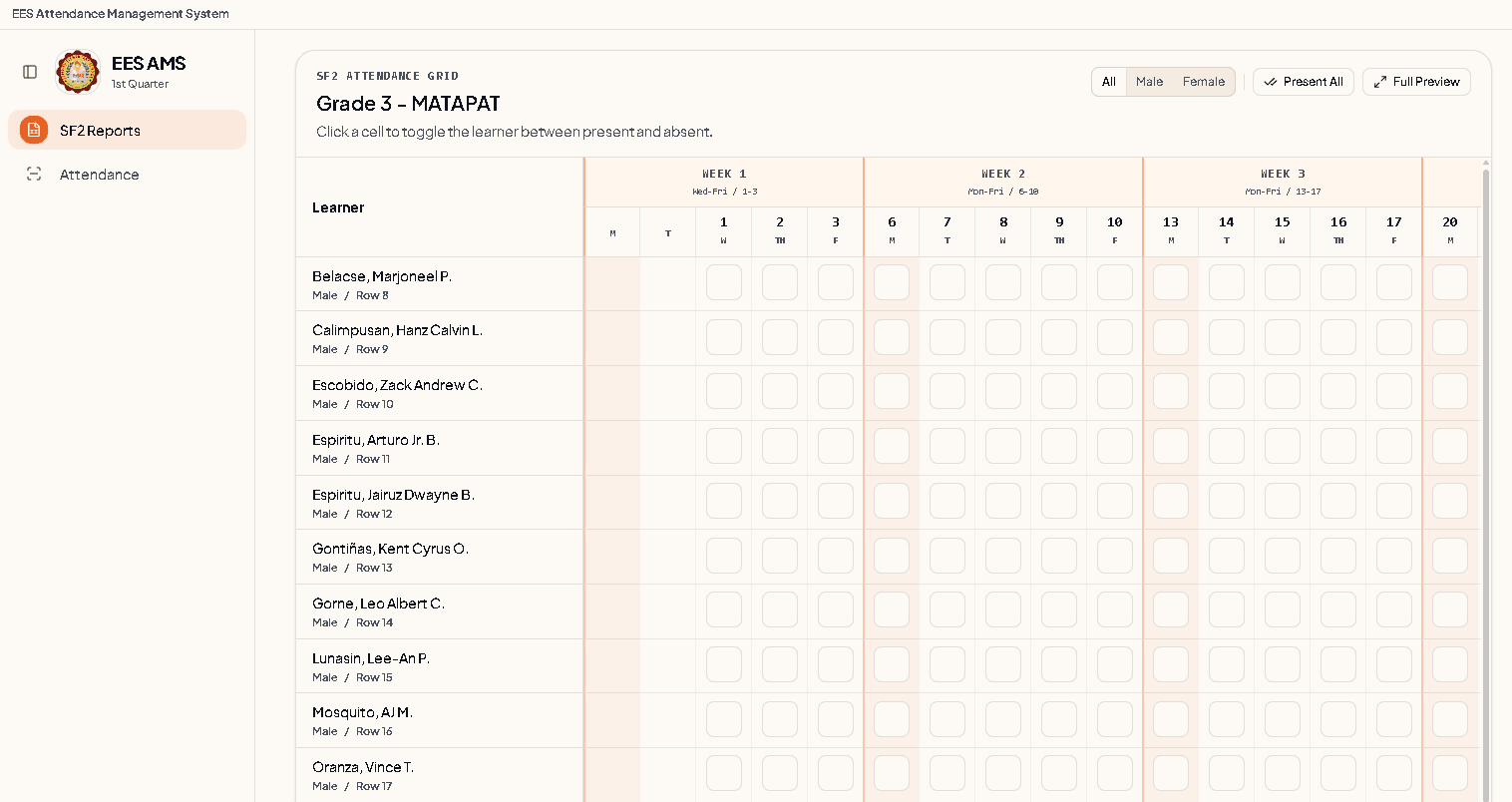
DepEd School Form 2 Automation & Attendance system
A cross-platform desktop application that automates attendance tracking and School Form 2 (SF2) reports for the Department of Education, with ID card reader support.
Tech Stack
 Tauri
Tauri SvelteKit
 Rust
Rust SQLite
README
EES-AMS - Espiritu Elementary School Attendance Management System





A cross-platform desktop application for student attendance management at Espiritu Elementary School with ID card reader support. Built with Tauri v2, SvelteKit 5, and Rust.
🏫 Elementary School Focused: This system is specifically designed and optimized for elementary school environments (EES - Elementary Education System), with features tailored to the unique needs of primary education institutions.
Features
- Cross-platform desktop app - Windows, macOS, Linux
- ID card reader support - Works with USB card readers as keyboard input
- Real-time attendance tracking - Instant data synchronization
- Offline-first design - No internet required
- SQLite database - Reliable local data storage
- Modern UI - Responsive SvelteKit 5 frontend
- Type-safe backend - Rust with comprehensive error handling
Architecture
┌─────────────────────────────────────────────────────────────┐
│                    Laptop (Tauri App)                       │
│                                                             │
│  ┌──────────────┐    ┌──────────────┐    ┌──────────────┐   │
│  │   Svelte UI  │───▶│  Tauri Cmds │───▶│   SQLite DB  │   │
│  │  (Frontend)  │    │    (Rust)    │    │  (Persistent)│   │
│  └──────────────┘    └──────────────┘    └──────────────┘   │
│         │                                                   │
│    ┌────▼────┐                                              │
│    │  Card   │  Tap card → auto-types serial → lookup       │
│    │ Reader  │                                              │
│    └─────────┘                                              │
│                                                             │
│              USB/Bluetooth Card Reader                      │
└─────────────────────────────────────────────────────────────┘
```## Prerequisites

- **Node.js** 18+ (for frontend development)
- **Rust** 1.77+ (for backend development)
- **Bun** (recommended package manager)
- **USB card reader** (keyboard wedge mode, optional)

## Installation

### Windows Release

Download the latest signed Windows installer from the button above, or open the [latest GitHub release](https://github.com/Drakaniia/EES-AMS/releases/latest) and choose `EES-AMS_windows-setup.exe`.

Installed apps check GitHub Releases for signed updates and show an in-app notification when a newer release is available.

### 1. Clone Repository

```bash
git clone https://github.com/your-username/espíritu-ams.git
cd espíritu-ams
2. Install Dependencies
# Frontend dependencies
bun install

# Rust dependencies
cd src-tauri && cargo fetch
3. Development Setup
# Start development server (both frontend and backend)
bun run tauri dev
Usage
Running the Application
Development Mode
bun run tauri dev
Production Build
bun run tauri build
The built executable will be in src-tauri/target/release/.
Card Reader Setup
- Connect card reader to laptop via USB
- Open Attendance page in the app
- Tap a card on the reader — serial auto-fills into the input
- System records attendance automatically
Card Workflow
- Register student cards in the Students section (enter serial manually)
- Tap ID card on the card reader during attendance
- System matches serial to student and records attendance
- View reports in real-time
Project Structure
espíritu-ams/
├── src/                    # SvelteKit frontend
│   ├── lib/
│   │   ├── components/     # Reusable UI components
│   │   ├── entities/       # TypeScript types
│   │   └── db-rust.ts     # Tauri command wrappers
│   ├── routes/            # Page routes
│   └── app.css           # Global styles
├── src-tauri/             # Rust backend
│   ├── src/
│   │   ├── domain/        # Business logic
│   │   ├── infrastructure/ # Database & hardware
│   │   └── commands.rs    # Tauri commands
│   └── Cargo.toml        # Rust dependencies
├── static/               # Static assets
└── docs/                # Documentation
Development
Code Quality Checks
# Frontend checks
bun run check && bun run lint && bun run typecheck

# Backend checks
cd src-tauri && cargo check && cargo clippy
Code Formatting
# Frontend
bun run format

# Backend
cd src-tauri && cargo fmt
Testing
# Frontend tests
bun test

# Backend tests
cd src-tauri && cargo test
Security
- Local only - No network connectivity required
- No authentication - Designed for single-teacher use case
Troubleshooting
Card Reader Issues
Problem: Card reader not typing into input
- Ensure reader is in keyboard wedge/HID mode
- Check that the input field is focused
- Try typing the serial manually to verify lookup works
Performance
- Connection pooling - r2d2 for SQLite connections
- Async runtime - Tokio for concurrent operations
- Zero-copy - Minimal data cloning in Rust
- Optimized builds - LTO and aggressive optimizations
Contributing
- Fork the repository
- Create feature branch (
git checkout -b feature/amazing-feature) - Commit changes (
git commit -m 'feat: add amazing feature') - Push to branch (
git push origin feature/amazing-feature) - Open Pull Request
Commit Convention
feat:- New featuresfix:- Bug fixesdocs:- Documentation updatesstyle:- Code formattingrefactor:- Code refactoringtest:- Test additions/updates
License
This project is licensed under the MIT License - see the LICENSE file for details.
Acknowledgments
- Tauri - Cross-platform app framework
- SvelteKit - Modern web framework
- Rust - Systems programming language
- SQLite - Reliable database engine
Support
For support and questions:
- Documentation: Check the
/docsfolder - Issues: Open an issue on GitHub
- Discussions: Use GitHub Discussions for questions
EES-AMS - Modern attendance management system designed exclusively for elementary schools (EES - Elementary Education System).
Last updated: August 22, 2026