Magic Port Killer
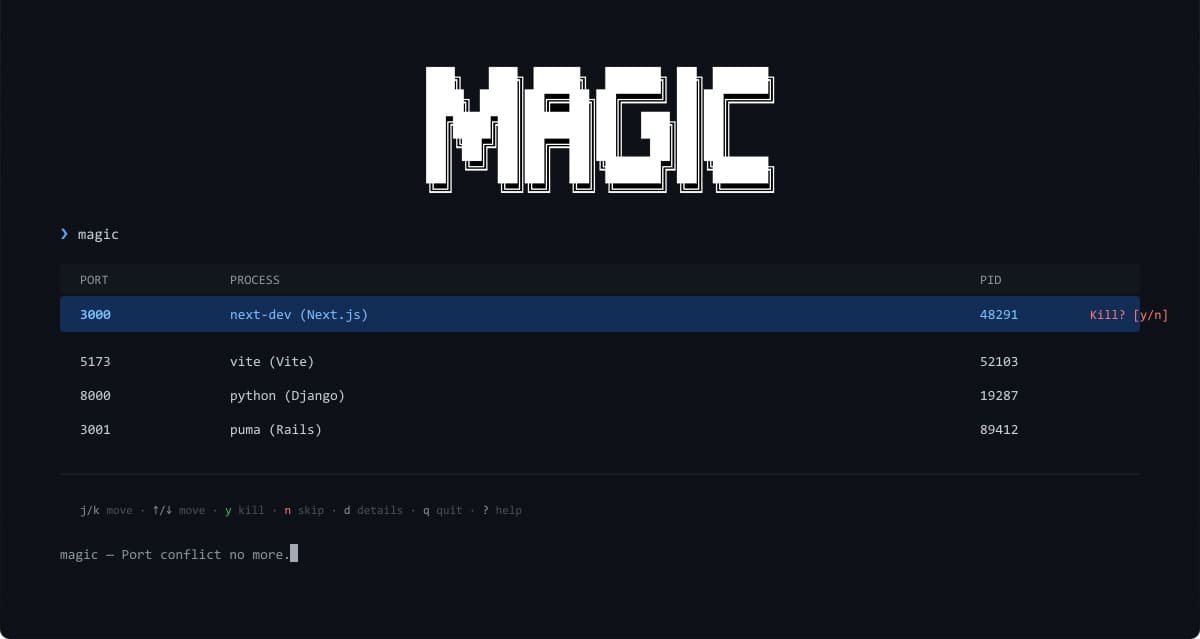
A globally installable terminal port killer for local development. Scans common dev ports, shows the running processes in an interactive TUI, and makes killing stuck port processes as easy as typing magic.
Port conflicts are the silent killer of local dev. Magic Port Killer is a fast, globally
installable Rust CLI that scans the ports your dev servers actually use — Vite, Next.js,
Rails, Django, Expo, and more — and lets you find and kill the stuck process from a clean
interactive TUI. No more hunting through lsof output or restarting your machine.
Tech Stack
 Rust
Rust CLITUI
README
Magic Port Killer
magic is a globally installable terminal port killer for local development.
It scans common dev ports, shows the running processes in an interactive TUI,
and makes it easy to kill stuck port processes by typing magic in your terminal.
Default ports cover common local development servers, including Tauri/Svelte, Vite, Next.js, Rails, Angular, Astro, Django, Flask, ASP.NET, Spring, Expo, Storybook, Jupyter, Cloudflare Workers, and live-reload ports.
Install
Windows:
irm https://raw.githubusercontent.com/Drakaniia/magic/main/scripts/install.ps1 | iex
macOS/Linux:
curl -fsSL https://raw.githubusercontent.com/Drakaniia/magic/main/scripts/install.sh | sh
Open a new terminal after installing, then run:
magic
Usage
magic
magic 3000,5173
magic --profile api
portkill
magic list 3000,5173 --tcp
magic list --json
magic kill 3000
magic kill 3000 --yes --quiet
magic kill 3000 --yes --tree
magic config show
magic config set-ports 3000,5173,8080
magic config set-profile api 7000,7001
magic completions bash
Port resolution order is:
CLI ports > MAGIC_PORTS > saved profile/default config > built-in defaults
Set MAGIC_CONFIG_DIR or MAGIC_CONFIG_PATH to place the config somewhere
specific, such as a project-local test fixture.
Inside the TUI:
Up/Down or j/k  move selection
g/Home          jump to first process
G/End           jump to last process
Space           mark or unmark process
a               mark all or clear all
Enter           review selected process(es)
y               graceful termination, then force fallback if needed
f               force kill immediately
n/Esc           cancel confirmation
r               rescan
q               quit
Wide terminals show the process table beside a selected-process inspector with PID, port/protocol, mark state, command, working directory, executable path, and parent PID. The confirmation view lists exact selected PIDs, ports, protocols, and available process identity before termination. Post-kill results stay visible until the next explicit scan or action.
Docs
Development
cargo fmt -- --check
cargo test
cargo run
License
MIT
Last updated: August 22, 2026